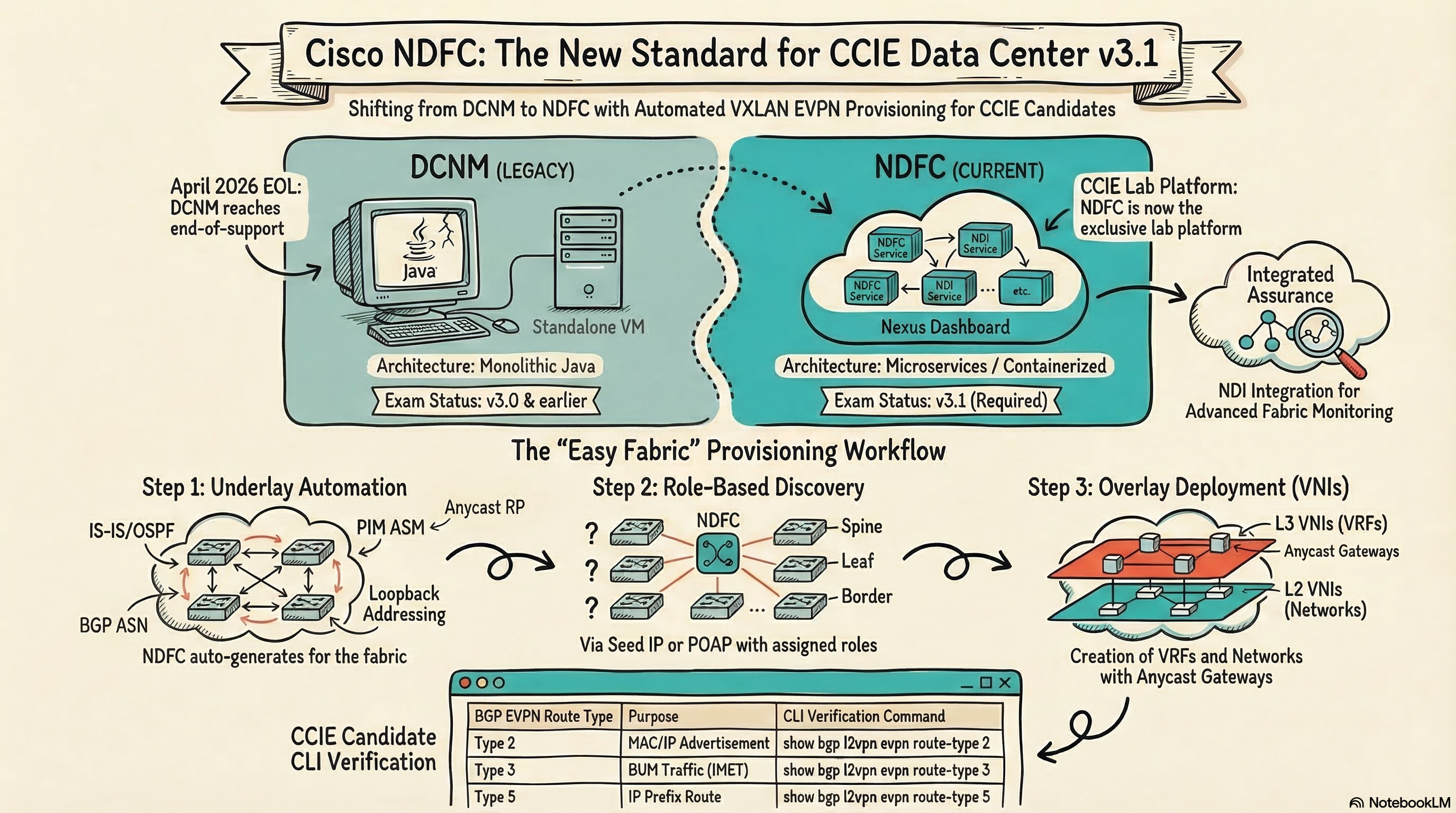
Cisco NDFC (Nexus Dashboard Fabric Controller) is the platform that provisions, manages, and monitors VXLAN BGP EVPN data center fabrics — and it’s the controller platform tested on the CCIE Data Center v3.1 lab exam. If you’ve been studying with DCNM, you’re working with a tool that reaches end-of-support in April 2026. NDFC is what you’ll face in the exam room.
Key Takeaway: NDFC’s Easy Fabric workflow can deploy a complete VXLAN EVPN fabric in minutes, but CCIE candidates who don’t understand the NX-OS configuration NDFC generates underneath will fail troubleshooting tasks — you need both the GUI workflow and the CLI verification skills.
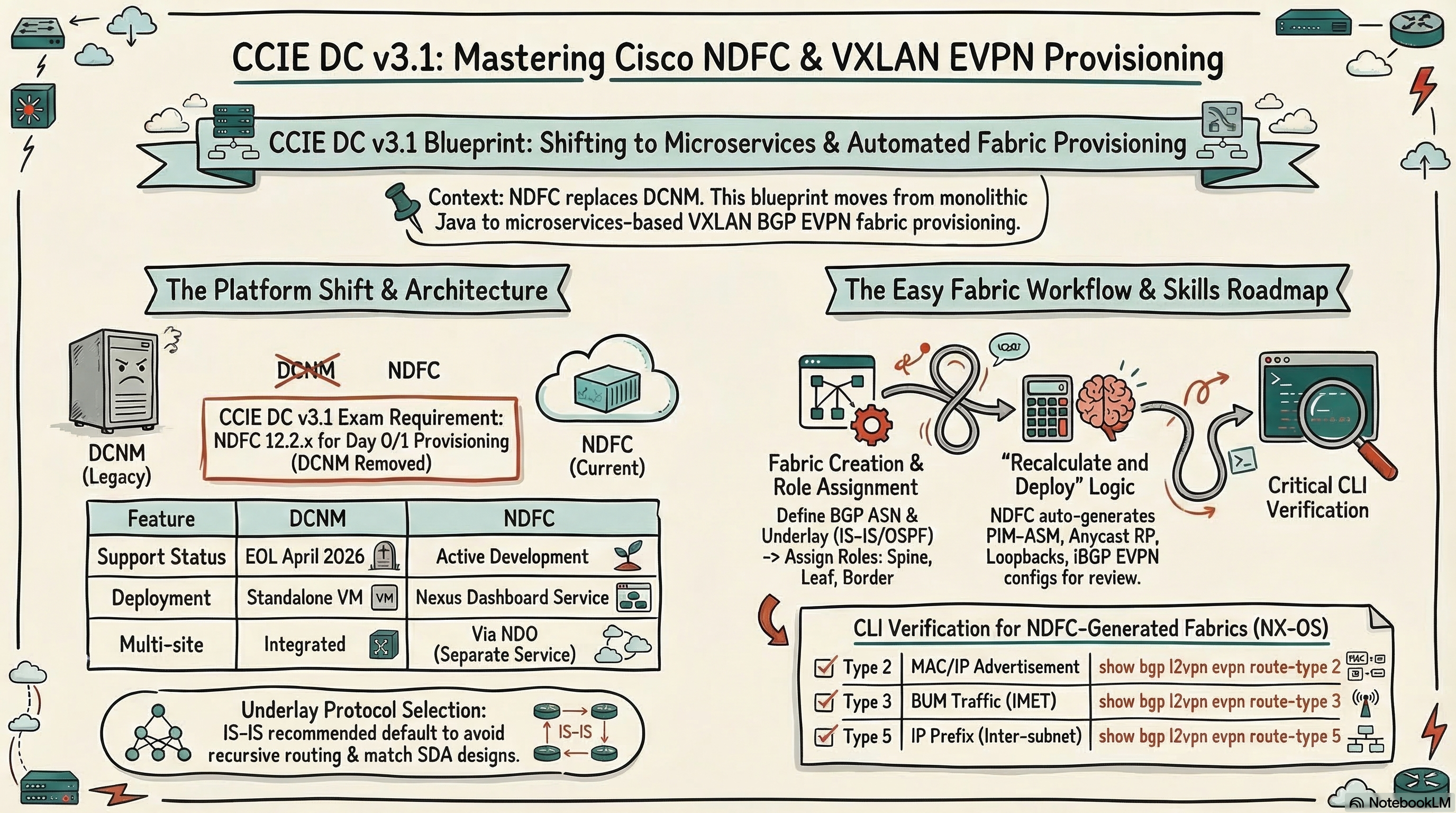
What Changed from DCNM to NDFC?
DCNM (Data Center Network Manager) was a standalone Java-based application. NDFC is a microservices-based application running on the Nexus Dashboard platform alongside Nexus Dashboard Insights (NDI) and Nexus Dashboard Orchestrator (NDO).
According to the CCIE DC v3.1 release notes, the v3.1 revision explicitly adds “Nexus Dashboard with Orchestrator, Fabric Controller, and Insights services” and removes DCNM. This is a significant platform change.
| Feature | DCNM | NDFC |
|---|---|---|
| Deployment | Standalone VM/OVA | Service on Nexus Dashboard |
| Architecture | Monolithic Java | Microservices, containerized |
| Fabric types | Easy Fabric, VXLAN, classic LAN | Same + Campus VXLAN, External |
| Multi-site | Via DCNM | Via NDO (separate service) |
| Assurance/insights | Basic monitoring | Integrated with NDI |
| API | REST API (limited) | Full REST API + Terraform provider |
| CCIE DC exam | v3.0 and earlier | v3.1 (current) |
| Support status | EOL April 2026 | Active development |
According to Cisco’s NDFC deployment guide: “DCNM has entered its End of Life, with support scheduled to stop completely in April 2026 and no new features being added. New features will continue to be introduced in NDFC.”
What Catches DCNM Users Off-Guard in NDFC
- Navigation changes — NDFC’s left-nav structure differs from DCNM’s tabbed interface
- Fabric creation wizard — more parameters exposed upfront, different field ordering
- Deploy workflow — “Recalculate and Deploy” replaces DCNM’s “Deploy” button with a preview + diff step
- Integrated topology view — real-time fabric visualization is now part of the fabric controller, not a separate tool
How Does the NDFC Easy Fabric Workflow Provision VXLAN EVPN?
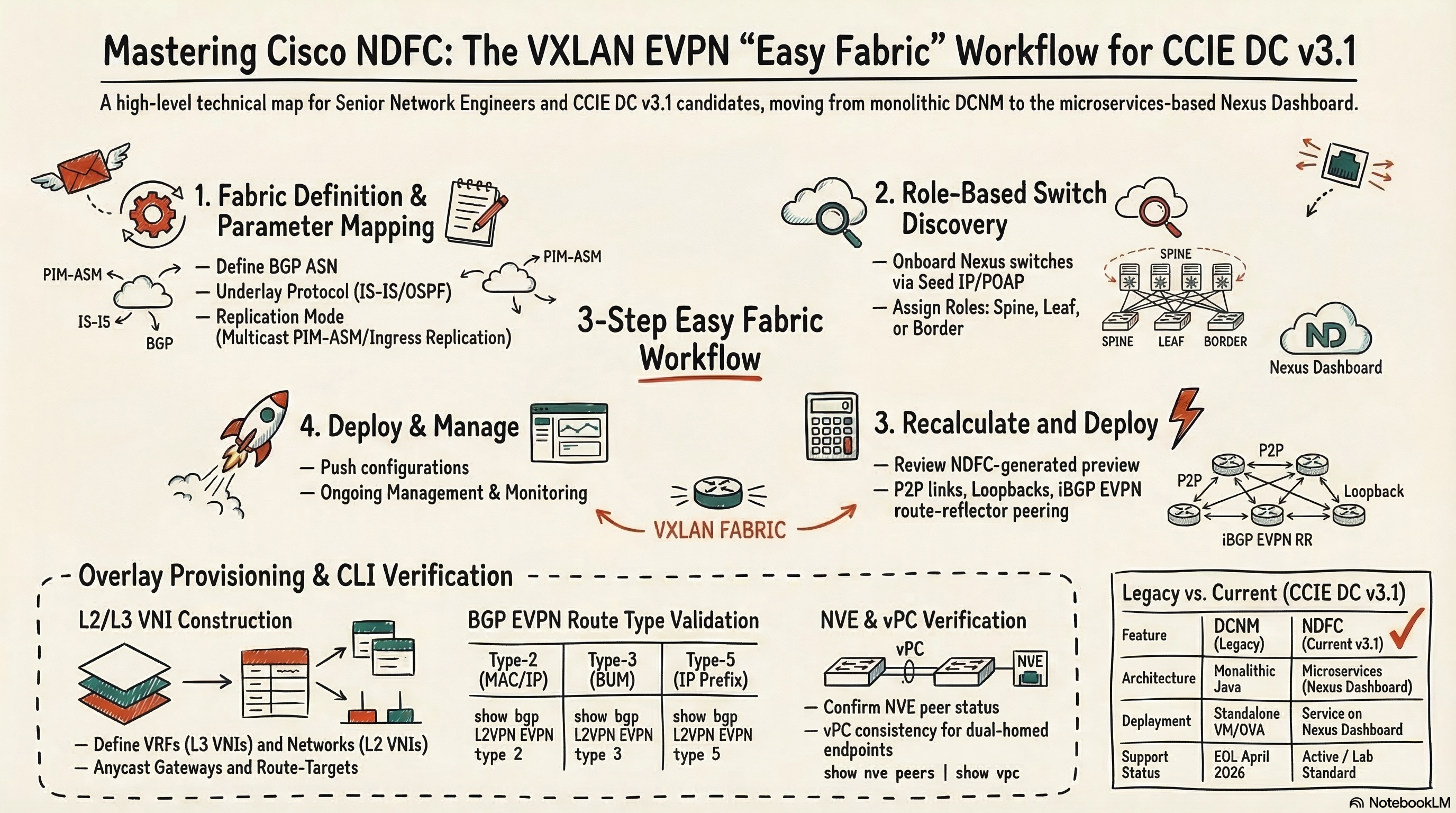
The Easy Fabric workflow is NDFC’s flagship feature — it provisions a complete VXLAN BGP EVPN fabric from a single template. According to Cisco Live BRKDCN-2929 (2025), Easy Fabric “embeds best practices” for IP addressing, overlay pools, routing profiles, and replication attributes.
Here’s the complete workflow:
Step 1: Create the Fabric
Navigate to Fabric Controller → LAN → Fabrics → Create Fabric and select “Data Center VXLAN EVPN.”
Key parameters you’ll configure:
| Parameter | Description | Typical Value |
|---|---|---|
| Fabric Name | Unique identifier | DC1-VXLAN |
| BGP ASN | BGP AS number for the fabric | 65001 |
| Underlay Protocol | IS-IS (recommended) or OSPF | IS-IS |
| Replication Mode | Multicast or Ingress Replication | Multicast |
| Multicast Group Subnet | PIM ASM group range | 239.1.1.0/25 |
| Anycast RP | Enable Anycast RP on spines | Enabled |
| Loopback0 IP Range | Router IDs | 10.2.0.0/22 |
| Loopback1 IP Range | VTEP (NVE) source | 10.3.0.0/22 |
| Subnet Range | P2P inter-switch links | 10.4.0.0/22 |
The fabric template contains hundreds of parameters, but these core settings define the underlay design. NDFC auto-calculates the rest using best practices.
Step 2: Discover and Assign Switch Roles
Add switches via:
- Seed IP discovery — provide the management IP of one switch; NDFC discovers neighbors via CDP/LLDP
- POAP (PowerOn Auto Provisioning) — new switches boot and register with NDFC automatically
- Manual add — enter switch credentials and management IPs
Once discovered, assign roles to each switch:
| Role | Function | Typical Platform |
|---|---|---|
| Spine | Route reflector, underlay/overlay hub | Nexus 9500, 9300 |
| Leaf | Server-facing, VTEP, gateway | Nexus 9300, 9200 |
| Border Leaf | External L3 connectivity | Nexus 9300 |
| Border Spine | Combined spine + external | Nexus 9500 |
| Border Gateway | Multi-site EVPN gateway | Nexus 9300, 9500 |
NDFC validates that the assigned roles make topological sense — for example, it won’t let you assign a spine role to a switch that only connects to hosts.
Step 3: Deploy the Underlay
After role assignment, click Recalculate and Deploy. NDFC generates the complete underlay configuration:
What NDFC auto-generates:
- IS-IS (or OSPF) — adjacencies between all spine-leaf links, point-to-point network type
- PIM sparse-mode — with anycast RP on spine switches
- Loopback0 — unique per switch, used as router ID and BGP peering source
- Loopback1 — unique per VTEP, used as NVE source interface
- Point-to-point links — /30 or /31 addressing between spine and leaf
- iBGP EVPN — spine as route reflectors, leaf as BGP EVPN clients
Before deploying, NDFC shows a configuration preview — the actual NX-OS commands that will be pushed. This is critical for CCIE candidates: review the generated config to understand what the GUI is doing.
Example of NDFC-generated underlay config on a leaf switch:
feature isis
feature pim
feature bgp
feature nv overlay
feature vn-segment-vlan-based

router isis UNDERLAY
  net 49.0001.0100.0200.0003.00
  is-type level-2

interface loopback0
  ip address 10.2.0.3/32
  ip router isis UNDERLAY
  ip pim sparse-mode

interface loopback1
  ip address 10.3.0.3/32
  ip router isis UNDERLAY
  ip pim sparse-mode

interface Ethernet1/49
  description to-spine1
  no switchport
  mtu 9216
  ip address 10.4.0.5/30
  ip router isis UNDERLAY
  ip pim sparse-mode
  no shutdown

router bgp 65001
  router-id 10.2.0.3
  neighbor 10.2.0.1
    remote-as 65001
    update-source loopback0
    address-family l2vpn evpn
      send-community both
      route-reflector-client
Step 4: Create VRFs (L3 VNIs)
Once the underlay is deployed, create VRFs for tenant isolation:
Navigate to Fabric → VRFs → Create VRF:
| Field | Description | Example |
|---|---|---|
| VRF Name | Logical name | TENANT-A |
| VRF ID / VNI | L3 VNI for inter-subnet routing | 50001 |
| VLAN ID | SVI VLAN for the L3 VNI | 3001 |
| Route Target | Auto-generated or manual | 65001:50001 |
| Maximum Routes | VRF-level route limit | 10000 |
After creating the VRF, attach it to leaf switches where tenant workloads exist. NDFC generates the NX-OS VRF configuration:
vrf context TENANT-A
  vni 50001
  rd auto
  address-family ipv4 unicast
    route-target both auto
    route-target both auto evpn
Step 5: Create Networks (L2 VNIs)
Networks are the overlay segments — each maps to a VLAN + VNI + anycast gateway:
Navigate to Fabric → Networks → Create Network:
| Field | Description | Example |
|---|---|---|
| Network Name | Logical name | WEB-SERVERS |
| VLAN ID | Local VLAN on the leaf | 100 |
| VNI | L2 VNI for the segment | 30100 |
| Gateway IP | Anycast gateway (same on all leaves) | 10.10.100.1/24 |
| VRF | Parent VRF | TENANT-A |
Attach the network to specific leaf switches and deploy. NDFC generates:
vlan 100
  vn-segment 30100

interface Vlan100
  vrf member TENANT-A
  ip address 10.10.100.1/24
  fabric forwarding mode anycast-gateway
  no shutdown

interface nve1
  member vni 30100
    mcast-group 239.1.1.1
  member vni 50001 associate-vrf
Step 6: Verify and Troubleshoot
NDFC provides a topology view showing fabric health, but CCIE candidates must verify with CLI:
! Verify NVE peers (VXLAN tunnel endpoints)
show nve peers

! Verify BGP EVPN neighbor state
show bgp l2vpn evpn summary

! Verify VXLAN VNI mapping
show nve vni

! Verify MAC learning via EVPN
show l2route evpn mac all

! Verify anycast gateway
show interface vlan 100

! Verify underlay reachability
show isis adjacency
show ip pim neighbor
What Does NDFC Generate That You Must Understand for CCIE?
NDFC abstracts away configuration, but the CCIE lab tests your understanding of what’s underneath. Here are the critical areas:
BGP EVPN Route Types
NDFC configures iBGP EVPN, but the lab tests your ability to interpret BGP EVPN routes:
| Route Type | Purpose | CLI Verification |
|---|---|---|
| Type 2 | MAC/IP advertisement | show bgp l2vpn evpn route-type 2 |
| Type 3 | Inclusive multicast (BUM) | show bgp l2vpn evpn route-type 3 |
| Type 5 | IP prefix route (inter-subnet) | show bgp l2vpn evpn route-type 5 |
Multicast vs. Ingress Replication
NDFC lets you choose between:
- Multicast (PIM ASM) — BUM traffic flooded via multicast tree. Efficient for large fabrics but requires PIM underlay
- Ingress Replication — BUM traffic replicated unicast to each remote VTEP. Simpler but higher bandwidth consumption
The CCIE lab may test both. Understand the mcast-group vs ingress-replication protocol bgp commands under interface nve1.
VPC and Host-Facing Configuration
NDFC configures vPC (virtual PortChannel) between leaf pairs for dual-homed servers. The auto-generated config includes:
- vPC domain, peer-link, peer-keepalive
- vPC-specific NVE settings (
peer-vtepfor Type-5 routes) - Orphan port handling
Understanding vPC interaction with VXLAN EVPN is one of the most complex CCIE DC topics.
How Should You Practice NDFC for the CCIE Lab?
Option 1: Cisco CML + NDFC VM
Deploy NDFC as a VM in your lab alongside Nexus 9000v switches in Cisco Modeling Labs (CML). This gives you the full GUI experience with virtual switches. Requires significant RAM (32GB+ for NDFC alone).
Option 2: CLI First, NDFC Second
Start with our VXLAN EVPN fabric lab on EVE-NG to build CLI muscle memory, then layer NDFC on top. This ensures you understand the configuration NDFC generates before relying on the GUI.
Option 3: Cisco CCIE Practice Labs
According to Cisco’s CCIE Practice Labs page, practice lab pods include NDFC with pre-staged topologies. This is the closest to the actual exam environment.
What’s the Career Value of NDFC Expertise?
As we covered in our CCIE DC salary analysis, CCIE Data Center holders earn $168K average with top earners exceeding $220K. The market is shifting from ACI-heavy deployments to VXLAN EVPN standalone fabrics managed by NDFC — as explored in our ACI sunset analysis.
Engineers who can provision, operate, and troubleshoot NDFC-managed VXLAN EVPN fabrics are positioning themselves for the next wave of DC deployments. According to INE’s CCIE DC v3.1 guide (2026), NDFC is now central to the exam — and candidates who master both the GUI and CLI will have a significant advantage.
Frequently Asked Questions
What is NDFC and how is it different from DCNM?
NDFC (Nexus Dashboard Fabric Controller) is the replacement for Cisco DCNM. NDFC runs as a service on the Nexus Dashboard platform, offering integrated fabric provisioning, monitoring, and assurance. DCNM reaches end-of-support in April 2026.
Is NDFC used on the CCIE Data Center lab exam?
Yes. The CCIE DC v3.1 blueprint explicitly adds Nexus Dashboard with Fabric Controller and removes DCNM. Candidates must be comfortable with NDFC’s Easy Fabric workflow and the Nexus Dashboard UI.
What underlay protocol should I choose in NDFC Easy Fabric?
IS-IS is the default and recommended choice — it scales better, avoids recursive routing issues, and aligns with SDA underlay design. OSPF is available for environments with existing OSPF expertise.
Can I still use CLI to configure VXLAN EVPN instead of NDFC?
Yes. NDFC generates standard NX-OS configuration. For CCIE DC preparation, understand both approaches — NDFC for Day 0/1 provisioning and CLI for troubleshooting and verification.
What is the Easy Fabric workflow in NDFC?
Easy Fabric is NDFC’s automated provisioning workflow that configures the complete VXLAN BGP EVPN underlay and overlay from a single fabric template. You define fabric parameters, add switches, assign roles, and NDFC generates and deploys all configuration.
NDFC is the present and future of Cisco data center fabric management. Whether you’re provisioning production fabrics or preparing for the CCIE DC lab, mastering both the Easy Fabric GUI workflow and the NX-OS CLI underneath it is what separates CCIE-caliber engineers from everyone clicking buttons without understanding the output.
Ready to fast-track your CCIE journey? Contact us on Telegram @phil66xx for a free assessment.